# Updating the General Application

## The General Application

The [General Application](https://guide.techfleet.org/team-portal/new-teammate-handbook/project-training-teams/applying-to-tech-fleet-project-training/how-tech-fleet-project-applications-work) is the application you can fill out and reuse across project applications. We ask you questions about yourself and your training for Agile cross-functional teams. We primarily look for people who have observed Tech Fleet teams, trained in Servant leadership, and prepared in Agile philosophies on teams. You may not have done this when you initially filled out the General App, but have no fear. You can update it over time!

## Update Your Answers Over Time

As you observe and take masterclasses in Tech Fleet, you knowledge about servant leadership and Agile philosophies will grow over time. Update your answers on the General Application whenever you learn something new. This way, when teams review your applications for project training, it's based on the latest knowledge you have about these important subjects.

## How To Update the Tech Fleet General Application

**Go to the** [**General Application**](https://guide.techfleet.org/training-openings/application-forms)**.**

**Login with your email you used to sign up to Tech Fleet Discord.**

<figure><img src="https://2497269768-files.gitbook.io/~/files/v0/b/gitbook-x-prod.appspot.com/o/spaces%2FaLipvRvacoLEyzC54aBy%2Fuploads%2F5KzlPza0wkFJ1bM5Dq4q%2Fimage.png?alt=media&#x26;token=b6d87cc7-5d12-4431-8c7c-3566bf9dc730" alt=""><figcaption><p>Credit: Tech Fleet; showing the login screen of the general application for Tech Fleet.</p></figcaption></figure>

**You will receive an email with a security code, enter the security code to login.**&#x20;

<figure><img src="https://2497269768-files.gitbook.io/~/files/v0/b/gitbook-x-prod.appspot.com/o/spaces%2FaLipvRvacoLEyzC54aBy%2Fuploads%2FdhUvw2bWmovPAnzZykrD%2Fimage.png?alt=media&#x26;token=3ec63ab8-1f03-41b4-a6cf-f0fbcbc4e276" alt=""><figcaption><p>Credit: Tech Fleet; showing the security code on the screen of the general application for Tech Fleet.</p></figcaption></figure>

**Go to your profile at the top right.**

<figure><img src="https://2497269768-files.gitbook.io/~/files/v0/b/gitbook-x-prod.appspot.com/o/spaces%2FaLipvRvacoLEyzC54aBy%2Fuploads%2FjpGZkh0XuKP3LhBczKYW%2Fimage.png?alt=media&#x26;token=ac2e774c-a5c8-4daf-9385-7de409ebcd55" alt=""><figcaption><p>Credit: Tech Fleet; showing the first page of the Tech Fleet General Application and the profile at the top-right.</p></figcaption></figure>

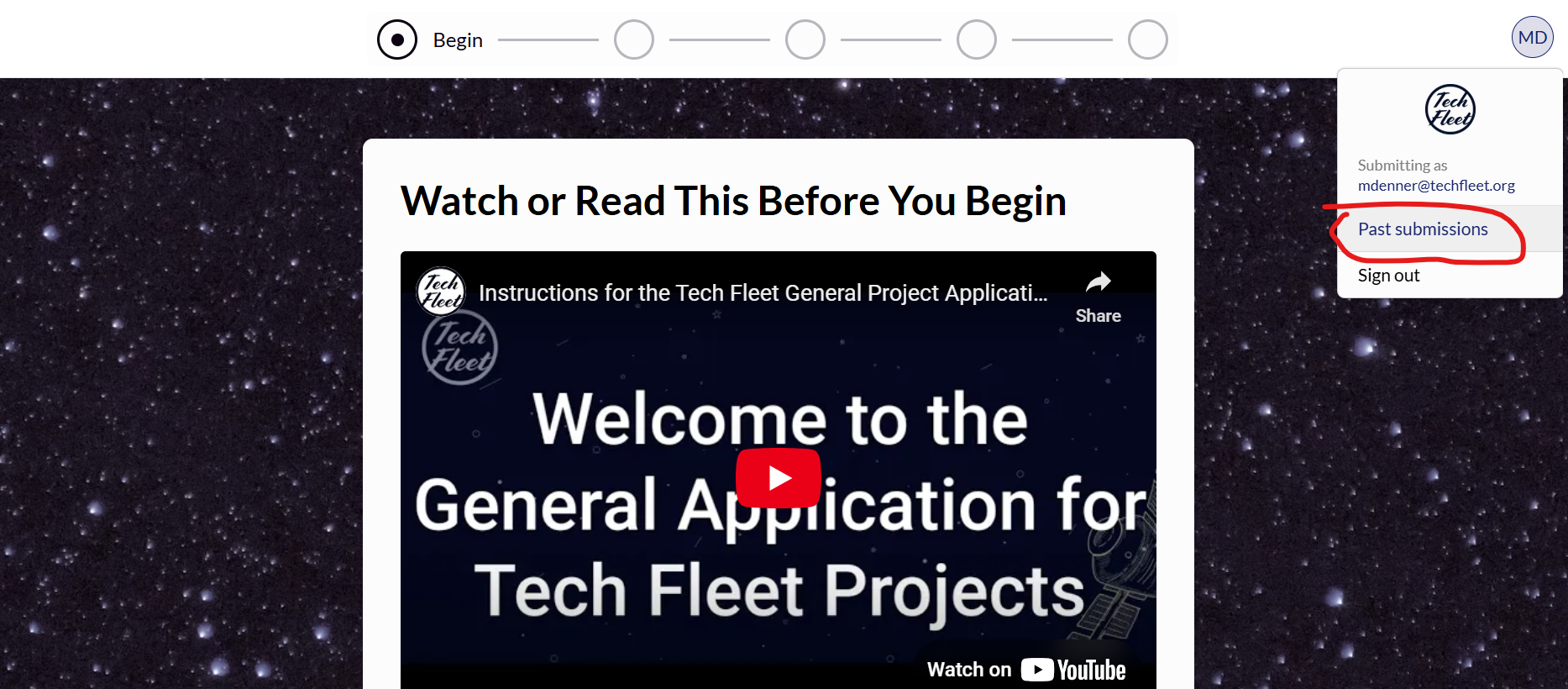
**Select the "Past Submissions" option.**

<figure><img src="https://2497269768-files.gitbook.io/~/files/v0/b/gitbook-x-prod.appspot.com/o/spaces%2FaLipvRvacoLEyzC54aBy%2Fuploads%2FCRtqr217kRWO0HFyiEPD%2Fimage.png?alt=media&#x26;token=7f773694-fea2-431f-a9fa-60f31ce4db39" alt=""><figcaption><p>Credit: Tech Fleet; showing the profile and "past submissions" option.</p></figcaption></figure>

**Select one of your previous submissions of the Tech Fleet General application.**

<figure><img src="https://2497269768-files.gitbook.io/~/files/v0/b/gitbook-x-prod.appspot.com/o/spaces%2FaLipvRvacoLEyzC54aBy%2Fuploads%2FOQSxkxRk5n3qpxXEP0RE%2Fimage.png?alt=media&#x26;token=d22f06ac-0dc5-4610-8fbf-2c2ce5be64a1" alt=""><figcaption><p>Credit: Tech Fleet; showing the profile and "past submissions" option.</p></figcaption></figure>

**Update your answers and submit!**&#x20;

The next time you apply, you can use your updated answers on the Project Phase Application.

<figure><img src="https://2497269768-files.gitbook.io/~/files/v0/b/gitbook-x-prod.appspot.com/o/spaces%2FaLipvRvacoLEyzC54aBy%2Fuploads%2FGEWjfstbe6ocztPwXqua%2Fimage.png?alt=media&#x26;token=3b7b4723-f028-407d-ba1e-63dbcf493e48" alt=""><figcaption><p>Credit: Tech Fleet; showing the profile and "past submissions" option.</p></figcaption></figure>

## Head to the next lesson